-前言-
Unity 製作遊戲時, 常用 Time.timeScale = 0 來處理遊戲暫停. 根據官方說明, 該值為 0 時能做到時間暫停的效果, 如: animation 停止播放, 物理運算停止, Time.deltaTime 也變為 0, 協程函式 yield WaitForSeconds 不再計時…等. 因此, 大部分開發都會選擇使用 Time.timeScale = 0 實現暫停效果.
-主旨-
本章節將試著探索 Time.timeScale = 0 在 MonoBehaviour 生命週期中對 FixedUpdate, Update, LateUpdate 事件函式的影響
- Time.timeScale 官方說明
- 測試程式碼
- 測試 timeScale = 1.0 與 timeScale = 0 的差異
- 協程函式: yield WaitForSeconds 與 yield WaitForFixedUpdate
Time.timeScale 官方說明
public static float timeScale;
Time.timeScale 為 Time 類別下的靜態變數.
The scale at which time passes. This can be used for slow motion effects.
代表時間流逝的縮放程度. 可用於實現慢動作效果.
When
timeScaleis 1.0 time passes as fast as realtime. WhentimeScaleis 0.5 time passes 2x slower than realtime.
當 timeScale 為 1.0 時是真實時間流逝的速度; 當該值為 0.5 時, 為 1/2 的真實時間流逝的速度, 也就是 slot motion effects.
When
timeScaleis set to zero the game is basically paused if all your functions are frame rate independent.
當 timeScale 為 0 時, 所有與 frame rate 無關的功能都將停止. Frame rate 指的是畫面刷新頻率. 從這裡不難猜測 timeScale = 0 時 game logic 與 渲染事件仍會被觸發.
Except for realtimeSinceStartup and fixedDeltaTime,
timeScaleaffects all the time and delta time measuring variables of the Time class.
timeScale 會影響所有 Time 類別的時間值與時間差值的變數, 除了 realtimeSinceStartup 與 fixedDeltaTime.
If you lower
timeScaleit is recommended to also lower Time.fixedDeltaTime by the same amount.
如果 timeScale 越低, 建議也將 Time.fixedDeltaTime 調低相對應的比例.
FixedUpdate functions will not be called when
timeScaleis set to zero.
當 timeScale 為 0 時, FixedUpdate 函式不會被呼叫.
測試程式碼
使用不受 timeScale 影響的 Time.realtimeSinceStartup 計算 FixedUpdate, Update 與 LateUpdate 的經過時間, 於應用程式結束時計算平均時間, 也印出 deltaTime 與 fixedDeltaTime 比較.
public class TimeScaleTest : MonoBehaviour
{
    public float TimeScale = 1;
    private float _lastUpdate = 0;
    private float _lastFixedUpdate = 0;
    private float _lastLateUpdate = 0;

    private int _updateCount = 0;
    private int _fixedUpdateCount = 0;
    private int _lateUpdateCount = 0;

    private float _accumulatedUpdateTime = 0;
    private float _accumulatedFixedUpdateTime = 0;
    private float _accumulatedLateUpdateTime = 0;

    void Start()
    {
        Time.timeScale = TimeScale;
    }

    void FixedUpdate()
    {
        _accumulatedFixedUpdateTime += Time.realtimeSinceStartup - _lastFixedUpdate;
        Debug.Log("[FixedUpdate] interval=" + (Time.realtimeSinceStartup - _lastFixedUpdate));
        _lastFixedUpdate = Time.realtimeSinceStartup;
        _fixedUpdateCount++;
    }

    void Update()
    {
        _accumulatedUpdateTime += Time.realtimeSinceStartup - _lastUpdate;
        Debug.Log("[Update] interval=" + (Time.realtimeSinceStartup - _lastUpdate));
        _lastUpdate = Time.realtimeSinceStartup;
        _updateCount++;
    }

    void LateUpdate()
    {
        _accumulatedLateUpdateTime += Time.realtimeSinceStartup - _lastLateUpdate;
        Debug.Log("[LateUpdate] interval=" + (Time.realtimeSinceStartup - _lastLateUpdate));
        _lastLateUpdate = Time.realtimeSinceStartup;
        _lateUpdateCount++;
    }

    void OnApplicationQuit()
    {
        Debug.LogError("[TimeScale] " + Time.timeScale);
        Debug.LogError("[FixedUpdate/Update]/LateUpdate] count = " + _fixedUpdateCount + " / " + _updateCount + " / " + _lateUpdateCount);
        Debug.LogError("[FixedUpdate/Update]/LateUpdate] avg time = " + _accumulatedFixedUpdateTime / _fixedUpdateCount
                                                                                                                        + " / " + _accumulatedUpdateTime / _updateCount
                                                                                                                        + " / " + _accumulatedLateUpdateTime / _lateUpdateCount);
        Debug.LogError("[FixedDeltaTime/DeltaTime] " + Time.fixedDeltaTime + " / " + Time.deltaTime);
    }
}
測試 timeScale = 1.0 與 timeScale = 0 的差異
統一 Project Settings 下的 Time 相關設定:
1. Fixed Timestep = 0.02 s.

2. FPS (Frame Per Second, 每秒刷新次數) 約為 60.
timeScale = 1.0 運行約 30s
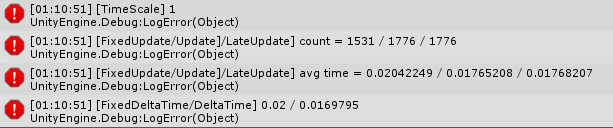
次數上, Update 與 LateUpdate相同, 由於 FPS 較高 FixedUpdate 間隔較 Update 大, 所以次數略低.
平均時間而言, 用 Time.realtimeSinceStartup 計算的平均間隔時間與 Time 類別提供的 delta 時間間隔差不多.
timeScale = 0 運行約 30s
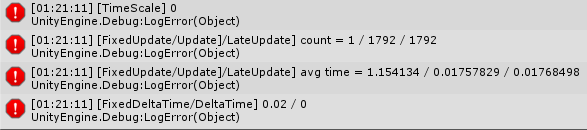
次數上, FixedUpdate 只執行了一次, 而且是在最一開始應用程式啟動的時候. 也就是說, timeScale = 0 時, 物件創建之初仍會執行 1 次 FixedUpdate.
平均時間上, 由於未排除 FixedUpdate 初始化時的情況, FixedUpdate 的平均時間就是第 1 次的時間, 且後續都沒有被呼叫, 因此 FixedUpdate 視為沒有被呼叫. Update 與 LateUpdate 皆與 scale 為 1 的情況相似. 推測 Update/LateUpdate 時間間隔與 FPS 相關, 且不受 timeScale 影響. fixedDeltaTime 維持 0.02 s的間隔, 而 deltaTime 則為 0. 符合官方說明的 deltaTime 受到 timeScale 影響.
比較結果表
| timeScale = 1 | timeScale = 0 | |
| Update/LateUpdate 次數 | FPS * 物件運行時間 | FPS * 物件運行時間 |
| FixedUpdate 次數 | 物件運行時間 / 0.02s (當前 Fixed Timestep 設定) | 0 |
| Update/LateUpdate 時間間隔 | 1/FPS | 1/FPS |
| FixedUpdate 時間間隔 | 0.02s (當前 Fixed Timestep 設定) | X |
| Time 類別 fixedDeltaTime | 0.02s (當前 Fixed Timestep 設定) | 0.02s (當前 Fixed Timestep 設定) |
| Time 類別 deltaTime | 1/FPS | 0 |
整理結果
- timeScale 影響 FixedUpdate 次數, 但不影響 Update/LateUpdate 次數, 因此不需要擔心 timeScale 為 0 時無法正常運行遊戲邏輯 (生命週期中的 game logic cycle). 而需要注意的是物理運算邏輯 (Physics cycle) 運行次數受到影響, 當 timeScale 為 0 是無法觸發 OnTriggerXXX, OnCollision 函式的.
- 若有使用 deltaTime 於遊戲邏輯 cycle, 必須注意 deltaTime的值已經經過 timeScale 縮放.
協程函式: yield WaitForSeconds 與 yield WaitForFixedUpdate
先看一段 WaitForSeconds 官方說明:
Suspends the coroutine execution for the given amount of seconds using scaled time.
The real time suspended is equal to the given time divided by Time.timeScale. See WaitForSecondsRealtime if you wish to wait using unscaled time. WaitForSeconds can only be used with a
yieldstatement in coroutines.
表示 WaitForSeconds 等待時間受到 timeScale 影響, 若 timeScale 為 0, 則等待時間近於無限大 (seconds / 0 = 無限大). 如果無論如何都必須讓等待時間比例為現實時間 (unscaled time), 請使用 WaitForSecondsRealtime.
WaitForFixedUpdate 說明:
Waits until next fixed frame rate update function. See Also: FixedUpdate.
WaitForFixedUpdate can only be used with a
yieldstatement in coroutines.
WaitForFixedUpdate 只有在 FixedUpdate 函式之後才執行. 也就是說, 當 timeScale = 0 時, FixedUpdate 不執行, WaitForFixedUpdate 也不執行.
-總結-
由於篇幅有限, 只討論的生命週期函式中的關鍵的幾個. 先給個 timeScale 概念, 後續遇到相關問題是再來深度探討, 若有更新的實驗結果也歡迎分享在下方~
謝謝觀看 😀
-延伸-
unity暂停游戏时Time.timeScale = 0的情况下
探討 timeScale 對 animation, animator 的影響
Unity3D研究院之Time.timeScale、游戏暂停(七十四)
探討到 timeScale 對音頻播放的影響
暂停界面UGUI交互暂停Time.timeScale为0的时候Button是否能够响应
實驗 timeScale = 0 對 UGUI 互動是否正常
 XunyiHuang - A Game Developer