移動式平台 app, 隨著功能特效增加, 物件趨漸精緻化的 3D 模組. 經常導致 app 容量肥大, 但要求使用者一次就下載所有資源似乎又不合理. 再者, 並不是所有地區的網路都很順暢且像台灣這樣有 “吃到飽" 的電信合約. 況且要是下載等了太久, 也有流失使用者的風險. 因此, 如果能只下載一部分的資源, 讓後續的資源隨著進程開放, i.e., Express 功能, VIP… 等等. 就能在前期給使用者相對良好的體驗了.
Unity Addressable System
Addressable 是一套 Unity 資源管理系統, 整合了過去的 Resources, Asset Bundles 系統, 提供更簡便設定來管理專案資源. 其最主要的特色就是 Address (尋址), 不需要太過在意 assets 來自哪裡 (Addressable 資源管理器會查詢出 asset 來源), 使用 address keys 就能加載/卸載 assets.

預載資源
當我們把部分資源放到遠程伺服器或雲端空間, 一般會在進入 app 主功能前先全部下載好, 然而再更進階的方式可以只下載一部分, 剩下的有需要使用時再下載. 本篇內容包含使用 Addressable 預先下載部分 assets, 用到 Addressable APIs:
官方對預載 (preload) 的建議如下:
將需要 preload 的 addressable asset 加上 label “preload" (其他名稱也都可以), 使用 DownloadDependenciesAsync 下載 key “preload".

本篇也會使用同樣概念 label “preload" 示範預載資源的使用方式, 並觀察相依資源的處理,
以下是使用的版本:
Unity 2020.3.19f
Addressable 1.18.16
設置 Remote Group
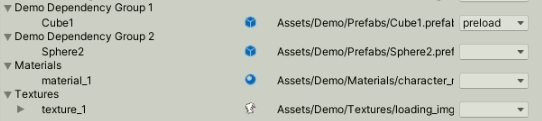
準備 4 個 Group, 分別是:
– Demo Dependency Group1: Cube1 (prefab)
– Demo Dependency Group2: Shphere2 (prefab)
– Materials: material_1
– Textures: texture_1
為 Cube1 添加 Label “preload" 代表這個 asset 需要先下載.

程式碼
1. 計算下載資源 (所包含的大小) 大小
// 計算下載 key 的包需要的大小
private async Task calculateKeyDownloadSizeSync(object key)
{
	// 計算 single key 下載內容
	long lSize = 0L;
	try
	{
		lSize = await Addressables.GetDownloadSizeAsync(key).Task;
		if (lSize > 0)
		{
			Debug.Log($"[Patcher] Calculate key [{key}] Download Size Sync: {lSize}");
		}
	}
	catch (Exception ex)
	{
		Debug.LogError($"[Patcher] Calculate key [{key}] Download Size Sync exception: {ex.Message}");
	}
	return lSize;
}
2. 下載資源包
private int m_iLastPercentage = -1;
private bool m_bUpdateKeyProgress = false;

private AsyncOperationHandle m_CurrentHandle;
private object m_objCurrentKey = null;

// 開始下載 key 涵蓋的包
private void downloadResource(object key)
{
	Debug.Log($"[Patcher] Download key [{key}]");
	m_objCurrentKey = key;
	m_iLastPercentage = -1;

	try
	{
		m_CurrentHandle = Addressables.DownloadDependenciesAsync(m_objCurrentKey);
		m_CurrentHandle.Completed += onDownloadDependencyComplete;
		m_bUpdateKeyProgress = true;
	}
	catch (Exception ex)
	{
		Debug.LogError($"[Patcher] Download key [{key}] exception: {ex.Message}");
	}
}

// 更新下載完成進度
private void updateDownloadPercentage()
{
	if (m_bUpdateKeyProgress)
	{
		m_iLastPercentage = (int)(m_CurrentHandle.GetDownloadStatus().Percent * 100);
		Debug.Log($"[Patcher] Download key [{m_objCurrentKey}] Progress: {m_iLastPercentage}%");

		// TODO: UI 更新顯示進度
		// ...
	}
}

// 下載完成
private void onDownloadDependencyComplete(AsyncOperationHandle handler)
{
	if (m_bUpdateKeyProgress)
	{
		m_iLastPercentage = (int)(handler.GetDownloadStatus().Percent * 100);
		m_bUpdateKeyProgress = false;
		Debug.Log($"current handler: {m_objCurrentKey} download complete");

		if (AsyncOperationStatus.Failed == handler.Status)
		{
			if (handler.OperationException != null)
			{
				Debug.LogError($"[Patcher] Download key [{m_objCurrentKey}] handler exception: {handler.OperationException.Message}");
			}

			Addressables.Release(m_CurrentHandle);
			m_objCurrentKey = null;
			return;
		}

		Addressables.Release(m_CurrentHandle);
		m_objCurrentKey = null;
	}
}
運行後結果:
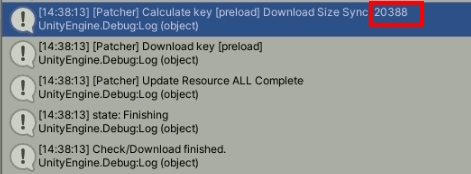
下載 preload 資源共 20388 bytes, 其中包含 3 個包: Cube1(3184 bytes), material_1(2666 bytes), texture_1(14538 bytes).
我們看到 material_1, texture_1 所在的包也被下載了, 理由是 Cube1 的 dependency chain (相依鏈, 或者說是參考鏈) 包含了 material_1, texture_1, 因此必須連著 2 個包都一起下載.
檢查 assets 是否被下載了
GetDownloadSizeAsync 文件中表示, 如果該資源已經被下載了, 那麼 download size = 0.
所以我們同樣使用 GetDownloadSizeAsync 檢查這 4 個 keys: Cube1, Shphere2, material_1, texture_1 的 download size.
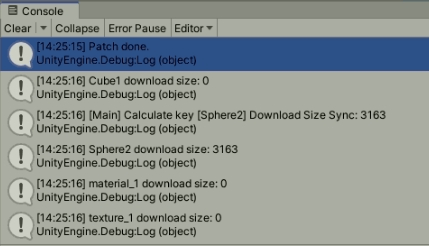
material_1, texture_1 為 0 的原因是都被 Cube1 引用了, 下載資源包時會連同相依的包一起下載.
清除下載資源包
另外, 下載途中遇到網路狀況不好導致下載中斷, 資源包缺損的情況, 可以清除資源包重新下載.
private void clearAddressableDownload()
{
	if (Caching.ClearCache())
	{
		Debug.Log("Successfully cleaned the cache");
	}
	else
	{
		Debug.LogError("Cache is being used");
	}
}
總結
以 Addressable 系統製作 preload assets 功能, 需要準備 preload 的 keys (最好是能加上 Label 好辨識與管理), 再來使用 GetDownloadSizeAsync 與 DownloadDependenciesAsync API 計算大小與下載.
參考文檔
1. Addressable Assets Overview – https://docs.unity3d.com/Packages/com.unity.addressables@1.19/manual/AddressableAssetsOverview.html
2. Download Dependencies Async – https://docs.unity3d.com/Packages/com.unity.addressables@1.18/manual/DownloadDependenciesAsync.html
3. ClearCache – https://docs.unity3d.com/2020.3/Documentation/ScriptReference/Caching.ClearCache.html
4. API GetDownloadSizeAsync – https://docs.unity3d.com/Packages/com.unity.addressables@1.18/api/UnityEngine.AddressableAssets.Addressables.GetDownloadSizeAsync.html
5. API DownloadDependenciesAsync – https://docs.unity3d.com/Packages/com.unity.addressables@1.18/api/UnityEngine.AddressableAssets.Addressables.DownloadDependenciesAsync.html
 XunyiHuang - A Game Developer