State pattern 是設計模式中屬於 “行為相關" 的類型, 常用於流程控制, AI控制…等等.
有關 state pattern 的詳細介紹可以參考 設計模式-狀態機模式 以及 prepare a State pattern for Unity, 介紹了state pattern 的基本結構與延伸的使用方式, 看完後深深感受了它的魅力!
剛接觸 state pattern 時, 覺得非常類似 Formal Language 學到的 Finite-state Machine, 一種數學運算模型. 以下列的圖說明:
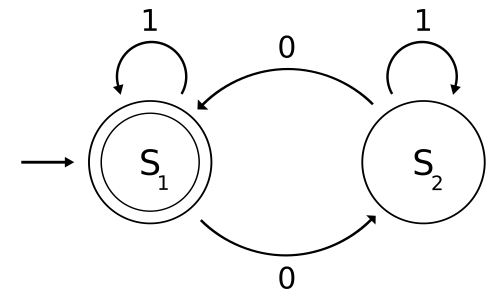
state machine 可以從一個 state 切換到另一個 state, 跟據不同的 input 切換到不同的 state. 而 Finite 指的是 state machine 是由一系列固定的 state 組成, 因此 finite-state machine 並不會無限制的發散.
state pattern 與 finite-state machine 的區別就像是 method 與 implementation. 當然, finite-state machine 的實作方式也有很多種的, 而 state pattern 只是其一.
這次便參考 Duck大大在 prepare a State pattern for Unity 分享的 state pattern 基礎模型, 應用於 Unity 場景轉換.
以一個簡單的遊戲流程示意:
首先是登入scene, 確認登入成功後進入主scene, 選擇進入戰鬥後到戰鬥scene. 每個 scene 都由 game loop controller 執行 start() 與 uptate().

public class GameLoopController : MonoBehaviour {

    SceneController sceneController;
    void Start () {
        // setup start state: login scene
        sceneController = new SceneController(new LoginScene());
    }

    void Update () {
        if (sceneController == null) {
            Debug.LogError("[SceneController] is null");
            return;
        }
        sceneController.StateUpdate();
    }
}
- Start(): 設定 start state
- Update(): 執行 current state 的行為 (透過呼叫 sceneController.StateUpdate())
不過這存在一個問題, game loop controller 繼承了 MonoBehaviour 必須存在於場景上才能執行 State() 與 Update(), 然而每次切換場景時, Unity 便會清空前一個場景, 導致每次切換 scene 後仍然從 start scene 開始運行. 有2種解決方案:
- 設定 game loop controller 為 DontDestroyOnLoad.
- Scene controller 為 Singleton
比較不推薦用 singleton, 因為這樣一來 scene controller 就很容易被其他程式取用, 影響複雜度. 所以暫時用第一個方案試試, 不過要注意只有 start scene 本身存在著 game loop controller, 其他 scene 都是從前一個 scene 留下的 game loop controller.
public class GameLoopController : MonoBehaviour {

    SceneController sceneController;
    void Awake() {
        DontDestroyOnLoad(transform.gameObject);
    }
    ...
}
接著在 scene state 中設定 StateBegin(), StateUpdate() 與 StateEnd() 內容. scene state 獨自管理所需調用的資源, 像是 UI 或 3D Object.
public class LoginScene : ISceneState {

    LoginPage loginPage;
    UIPanel panel;
    Character chara;

    public override void StateBegin() {
        base.state = StateType.Login;
        Debug.Log(state.ToString() + ": state begin");

        // Load and initialize UI
        loginPage = NGUITools.AddChild(panel, Resources.Load("Prefabs/LoginPage") as GameObject).GetComponent<LoginPage>();
        loginPage.GetComponent<LoginPage>().Initialize();

        // Load 3D Object
        chara = Instantiate(Resources.Load("Prefabs/Character") as GameObject, new Vector3(0, 0, 0), Quaternion.identity).GetComponent<Character>();
    }
    public override void StateUpdate() {
        Debug.Log(state.ToString() + ": state update");
        bool changeState = false;

        // TO DO: update character action and
        // check whether changing state or not
Character.UpdateAction();
        if (loginPage.IsLoginSuccess)
            changeState = true;

        if (changeState)
            base.Controller.TransStateTo(new MainScene());
    }
    public override void StateEnd() {
        Debug.Log(state.ToString() + ": state end");
        loginPage = null;
	panel = null;
	chara = null;
        SceneManager.LoadSceneAsync("MainScene", LoadSceneMode.Single);
    }
}
- StateBegin(): 資源(UI, 3D Object)的存取, 初始化設定
- StateUpdate(): 物件, UI 更新行為, 並確認是否轉換 state
- StateEnd(): 資源釋放, 並轉換 state
基本上用類似的方法做出 Main scene 與 Fighting scene, 就能完成這個 game 的基本架構. 當然可能還存在著更複雜的狀況, 像是 Scene controller 下還可能會有 AI Controller, Page Controller … 等其他的 state pattern 實作, 需要有清楚 state control 階層:

- Scene-State Controller: 負責存取 AI-State 與 Page-State Controller
- AI-State 與 Page-State Controller 彼此是 independent
或是有其他的 Singleton, MonoBehavior. 不過, 以 game loop 控制的好處是我們不必擔心場景中會有其他 MonoBehavior 執行 Update(), 所有的 Update() 順序都由 game loop 控制, 這讓 debug 變得容易許多!
第一次實作 state pattern 就到此, 要是有更好或其他 state 實作也會放上來分享的~
 XunyiHuang - A Game Developer